
Most growing businesses reach the same breaking point eventually. Accounting lives in one tool, inventory gets tracked in a spreadsheet someone updates by hand, and the sales team keeps customer details in yet another system that nobody else can see. Nothing is technically broken, but nothing talks to anything else either, and every month-end close turns into a small investigation to figure out whose numbers are actually correct.
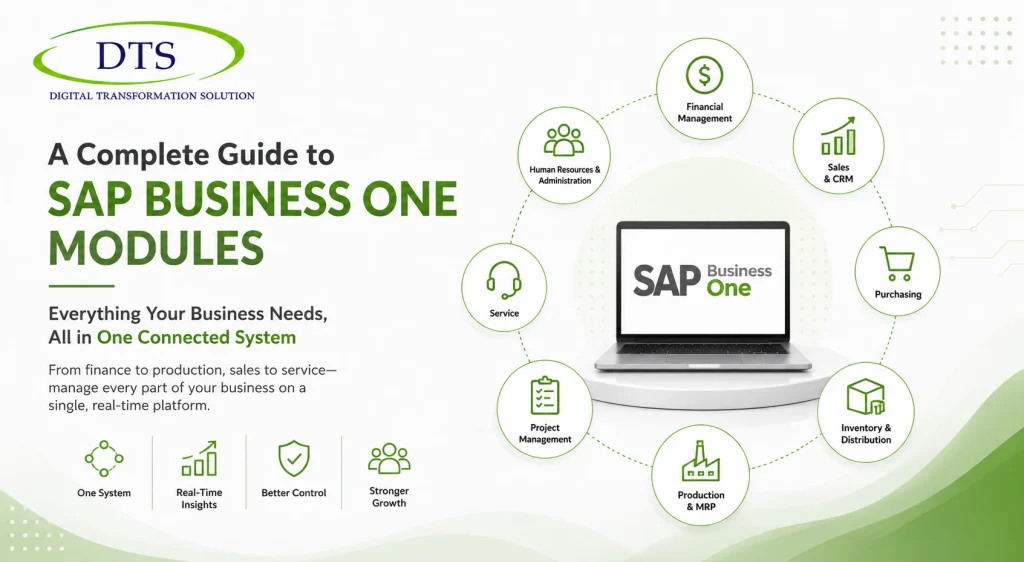
SAP Business One exists to solve exactly that problem. Rather than stitching together separate tools, it brings finance, inventory, sales, purchasing, and production into one connected system built on a single shared database. This guide walks through each of its core modules in plain terms, so you can see exactly what it does and where it would actually make a difference in how your business runs day to day.
What is SAP Business One, in Brief
SAP Business One is SAP’s ERP system built specifically for small and mid-sized businesses — a lighter, more affordable alternative to SAP’s enterprise-grade platforms. If you’re still weighing whether it’s the right fit for your business size compared to SAP’s larger offerings, our SAP Business One vs SAP S/4HANA comparison breaks that decision down in more detail. This guide assumes you’re past that question and want to understand what the system actually does once it’s in place.
Core SAP Business One Modules Explained
Financial Management
This is the backbone of the system. The Financial Management module handles the general ledger, accounts payable and receivable, budgeting, fixed assets, and multi-currency transactions for businesses operating across regions. Because it’s connected to every other module, a sale recorded in the CRM or a goods receipt logged in inventory flows straight into your financial records automatically — no manual re-entry, and no waiting until month-end to see where the business actually stands. Standard and custom financial reporting is built in, so pulling together numbers for management or an audit doesn’t mean exporting data from three different places first.
Inventory and Distribution
For businesses carrying physical stock, inventory is often one of the largest and most error-prone parts of the operation. This module tracks stock levels in real time, supports multiple warehouses and bin locations, and handles several costing methods so your valuation stays accurate as prices shift. Goods receipts, transfers, and issues are all logged automatically, and cycle counts help catch discrepancies before they turn into a bigger problem. For businesses juggling more than one warehouse, bin location management alone can noticeably cut down the time staff spend physically searching for stock.
Sales and CRM
The Sales and CRM module gives your team one place to track leads, opportunities, quotes, and the full sales pipeline, alongside a complete history of every customer interaction. Because it’s tied into the same database as everything else, sales staff can see a customer’s order history, outstanding balance, and service record without switching systems or asking someone in another department to look it up. That visibility tends to translate directly into faster, more informed conversations with customers — and fewer awkward moments where a salesperson promises something finance or inventory can’t actually deliver.
Purchasing
The Purchasing module manages the procurement side of the business: purchase orders, goods receipt POs, vendor invoices, and outgoing payments. It also maintains vendor and item master data, so purchasing history and pricing are consistent every time an order goes out. Because purchasing links directly to inventory and finance, a received order updates stock levels and triggers the right financial entries automatically, closing a loop that’s often disconnected in businesses running separate procurement and accounting tools.
Production and MRP
For manufacturers, this module supports multilevel bills of materials, production orders, and material requirements planning. It helps determine what needs to be produced, what materials are needed to produce it, and when — reducing the guesswork that leads to either production delays or excess inventory sitting unused. Pricing across bills of materials can be maintained globally, which matters for manufacturers managing dozens or hundreds of product variations at once.
Project Management and Service
Beyond core operations, SAP Business One includes tools for tracking project costs, timelines, and resources, along with a service module for managing service calls, contracts, and warranties. These are especially useful for businesses that don’t just sell a product once, but continue supporting it afterward — distributors, equipment sellers, and professional services firms in particular.
Human Resources and Administration
A lighter HR module handles employee records and basic workforce administration, while the Administration area covers system settings, user permissions, and configuration. These aren’t the headline features of SAP Business One, but they round out the platform so a business isn’t forced to run a completely separate system just to manage employee data.
How These Modules Work Together
The individual modules matter, but the real value of SAP Business One isn’t any single one of them — it’s that they all sit on the same shared database. When a sales order is entered, inventory updates automatically. When goods are received, the financial records update without anyone touching a spreadsheet. When a customer calls with a service issue, the person answering the phone can see their full order and payment history without putting them on hold to check another system. That kind of real-time connection is exactly what disconnected tools can’t offer, no matter how good each individual tool is on its own.
Which Businesses Get the Most Value from These Features?
- Manufacturers who need production planning, bills of materials, and inventory tightly connected to finance
- Distributors and wholesalers managing multiple warehouses and needing accurate, real-time stock visibility
- Retail businesses that need sales, inventory, and customer data working from the same source
- Professional services firms that rely on project costing, service tracking, and CRM working together
Customizing SAP Business One for Your Business
Out of the box, SAP Business One covers the core needs of most SMEs, but it’s also built to be adapted. User-defined fields and tables let businesses capture information specific to their operations without waiting on custom development. For more advanced needs, a wide range of third-party add-ons extend functionality further, and the system’s SDK allows deeper, more tailored customization when a business’s processes genuinely require it — which keeps the platform flexible without forcing every business into a rigid, one-size-fits-all template.
Getting Started with SAP Business One
Reading through a list of modules is one thing; seeing how they’d actually fit your specific operations is another. Our SAP Business One team walks businesses through exactly that — mapping the modules above against how your finance, inventory, and sales processes actually work today, so implementation solves real problems instead of just installing new software.
FAQs
What modules does SAP Business One have?
The core modules include Financial Management, Sales and CRM, Purchasing, Inventory and Distribution, Production and MRP, Project Management, Service, Human Resources, and Administration.
What does the finance module in SAP Business One do?
It handles the general ledger, accounts payable and receivable, budgeting, fixed assets, multi-currency transactions, and both standard and custom financial reporting.
Does SAP Business One have a CRM?
Yes. The Sales and CRM module tracks leads, opportunities, quotes, and a full history of customer interactions, all connected to the same database as sales and finance.
Can SAP Business One handle multi-warehouse inventory?
Yes. The Inventory and Distribution module supports multiple warehouses and bin locations, with real-time stock updates across all of them.
Is SAP Business One good for manufacturing businesses?
Yes. The Production and MRP module supports multilevel bills of materials, production orders, and material requirements planning, making it well suited to manufacturers.
How many modules are in SAP Business One?
SAP Business One is typically organized into around nine core modules covering finance, sales, purchasing, inventory, production, projects, service, HR, and administration.
Can SAP Business One modules be customized?Yes. Businesses can use user-defined fields and tables for lighter customization, and the SDK supports deeper, more tailored development when needed, alongside a range of third-party add-ons.